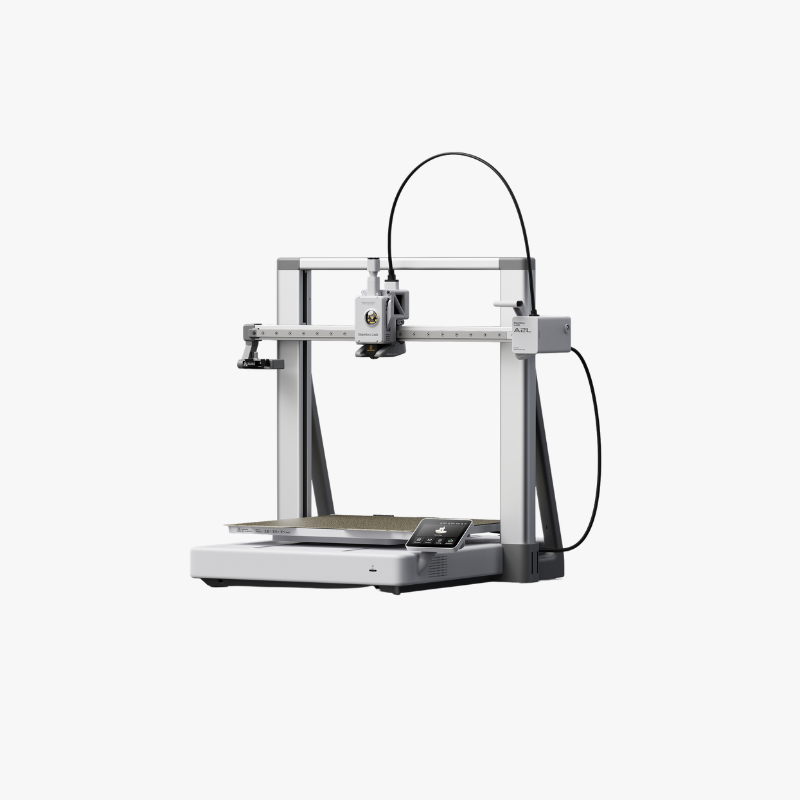
Description
Creative Playground. Extra Large.
Bambu Lab A2L – Large-Format 3D Printing
The Bambu Lab A2L combines an extra-large build area
with adaptive vibration compensation, automatic flow dynamics
calibration and intelligent extrusion monitoring.
Create larger prototypes, tall display models or batches of smaller
parts with more room to bring your ideas to life.
Standalone printer. AMS and AMS lite are sold separately.

Extra-Large Build Volume
A 330 × 320 × 325 mm workspace for larger models
and batches of smaller parts.
Adaptive Print Stability
Vibration compensation and integrated dampers help manage
movement as your print grows.
Automatic Flow Calibration
Automatic flow dynamics calibration helps reduce
manual adjustment before printing.
Modular Creative Tools
Optional upgrades add blade cutting and pen drawing
to your creative workflow.
Think Bigger
Extra-Large Volume for Extra-Bold Ideas
The A2L offers a 330 × 320 × 325 mm build volume.
Projects that fit within this space can be printed with fewer
separate sections, reducing assembly work.
Create a tall architectural model, develop a prototype or
arrange several products on the build plate. More room
gives you greater flexibility when planning each job.
- Cosplay helmets and props that fit within the build area
- Large prototypes and product mock-ups
- Architectural and educational models
- RC and robotics components
- Batch printing of small products
- Decorative pieces and workshop organisers
Check dimensions and orientation in your slicer.
Supports, brims and other settings can affect the available space.


Automatic Material System
Add Multicolour Printing When You Need It
Start with the standalone A2L and add a compatible automatic
filament system when your projects need more colours.
An optional AMS lite provides four spool positions for compatible
filament. Assign colours in Bambu Studio and let the system
manage filament changes during the print.
- Automatic filament switching with optional equipment
- Colour assignment through Bambu Studio
- More possibilities for labels and display models
- A setup you can expand as your needs change
AMS and AMS lite are not included.
Confirm the required connection accessories before ordering.
Multicolour printing can increase printing time and filament use.
Expand Your Workflow
Build a Setup Around Your Projects
Explore expansion options within the compatible Bambu Lab AMS
ecosystem. Your chosen configuration determines which units,
connections and accessories are required.
Contact The 3D Factory for help checking compatibility
before adding equipment to your printer.
Expansion equipment shown is optional.
AMS units and connection accessories are sold separately.

Engineered for Stability
Manage Vibration as Your Model Grows
Large and tall models change the load on a moving print bed.
The A2L uses Adaptive Vibration Compensation
to account for changing loads and toolhead positions.
This helps reduce ringing and vibration-related surface marks.
Two integrated granular dampers also help absorb frame vibration.
Place the printer on a stable surface and select settings
suited to your model and material.


More Than a 3D Printer
Add Blade Cutting and Pen Drawing
The optional Blade Cutting Upgrade Kit adds new creative
possibilities to the A2L platform.
Explore paper crafts, stickers, decorative details and
pen-drawn designs using compatible tools and materials.
- Optional blade-cutting functionality
- Pen drawing for creative projects
- New possibilities for mixed-media designs
- Combine printed parts with crafted details
Cutting and drawing upgrades are sold separately.
Check supported materials, thickness limits and mat requirements.
The A2L does not support laser modules.
MakerWorld Ecosystem
Find Your Next Project
Discover practical objects, decorative models and creative
projects in the MakerWorld community library.
Review the model instructions and choose a profile suitable
for your printer, nozzle and filament. Check the model licence
if you plan to sell printed items.
Visit the
official MakerWorld platform
.


Intelligent Monitoring
Identify Common Printing Problems
A closed-loop PMSM servo extruder monitors extrusion behaviour.
Dedicated sensors help identify common filament problems.
- Filament runout detection
- Filament tangle detection
- Nozzle-clog detection
- Physical nozzle-clumping detection
- Extrusion monitoring
These features support troubleshooting.
Suitable settings, dry filament and regular maintenance
remain important for reliable printing.
Repeatable Detail
Automatic Flow Dynamics Calibration
Automatic flow dynamics calibration helps account for
filament behaviour and reduces the need for manual tuning.
Select the appropriate material profile and follow
the filament manufacturer’s storage and drying guidance
when preparing your prints.

Plan Your Printing Space
Give the printer a stable surface and sufficient clearance
for the moving bed, cables and filament feed.
Allow access for maintenance and any optional accessories.
Choose Suitable Ventilation
Follow your filament’s safety guidance and provide
suitable ventilation for the workspace.
For schools and shared facilities, plan printer placement,
supervision and material use before installation.

Connect Your Way
Work with Bambu Studio and Bambu Handy
Prepare your models in Bambu Studio
and use Bambu Handy for supported mobile functions.
The A2L connects through 2.4 GHz Wi-Fi.
Together with MakerWorld, these tools help you find designs,
prepare models and manage your printing workflow.
What Can You Make with the Bambu Lab A2L?
Choose Filament for Your Project
PLA and PETG are useful starting points for many A2L projects.
Select your material according to the intended use,
required finish and operating conditions.
PLA
Display models, decorative pieces and visual prototypes.
PETG
Practical parts where PETG’s properties suit the application.
Specialist Materials
Check the exact filament, nozzle and feeding requirements.
Printer compatibility does not automatically mean compatibility
with an optional AMS system. Ask our team before choosing
flexible, abrasive or specialist filaments.
Browse our
3D printing filaments,
PLA filament
and
PETG filament.
Bambu Lab A2L Specifications
| Specification | Bambu Lab A2L |
|---|---|
| Configuration | Standalone printer |
| Build volume | 330 × 320 × 325 mm |
| Maximum printing speed | 500 mm/s |
| Maximum nozzle temperature | 300°C |
| Maximum bed temperature | 80°C |
| Extrusion system | PMSM closed-loop servo |
| Connectivity | 2.4 GHz Wi-Fi |
| AMS / AMS lite | Not included — sold separately |
| Creative upgrades | Optional blade cutting and pen drawing |
Maximum speed is a manufacturer specification.
Actual printing speed depends on the model, filament and quality settings.
Standalone A2L — Accessories Sold Separately
This listing is for the Bambu Lab A2L standalone printer.
AMS, AMS lite, blade-cutting and pen-drawing upgrades are not included.
Images may show optional equipment or projects made with additional
accessories. Contact us for help selecting a complete setup
or confirming individual package contents.
Buy the Bambu Lab A2L in Cyprus
Choose the Bambu Lab A2L from The 3D Factory,
an official Bambu Lab reseller and authorised repair centre in Cyprus.
Our Limassol team can help you choose compatible filament
and accessories, with delivery options across Cyprus.
- Specialist product guidance
- Local after-sales support
- Help choosing compatible materials and accessories
- Limassol collection and Cyprus delivery options
- Installation and training available by separate quotation
Check the current stock status and estimated dispatch information
on this page before ordering.
Related Links
FAQ – Bambu Lab A2L
What is the build volume of the Bambu Lab A2L?
The build volume is 330 × 320 × 325 mm.
Allow space for supports, brims and the selected model orientation.
Does this printer include AMS lite?
No. This is the standalone A2L printer.
AMS and AMS lite are sold separately.
What is the difference between A2L and A2L Combo?
The A2L is the standalone printer.
The A2L Combo package adds AMS lite for automatic filament switching.
Can I add multicolour printing later?
Yes. Add a compatible automatic filament system.
Contact us to check the equipment and connections required.
Can the A2L cut or draw?
Optional upgrades add blade cutting and pen drawing.
These tools are sold separately and have their own
material and setup requirements.
Can I add a laser module?
No. The A2L does not support laser modules.
Which filament should I choose?
PLA and PETG are useful starting points for many projects.
Check the exact filament requirements and choose according
to your intended application.
How fast can the A2L print?
The maximum rated printing speed is 500 mm/s.
Actual speed varies with the model, filament and settings.
Does the A2L detect print problems?
Its detection features include filament runout, filament tangles,
nozzle clogs and nozzle clumping, alongside extrusion monitoring.
Can I use Bambu Studio and Bambu Handy?
Yes. The A2L works within the Bambu ecosystem,
including Bambu Studio and Bambu Handy.
Where can I buy the Bambu Lab A2L in Cyprus?
Order from The 3D Factory, with local support,
Limassol collection and Cyprus delivery options.
Check current availability on this page.
Can I arrange installation and training?
Yes. Contact our team for a separate quotation based
on your location and training requirements.